Lead routing
Push and Pull distribution
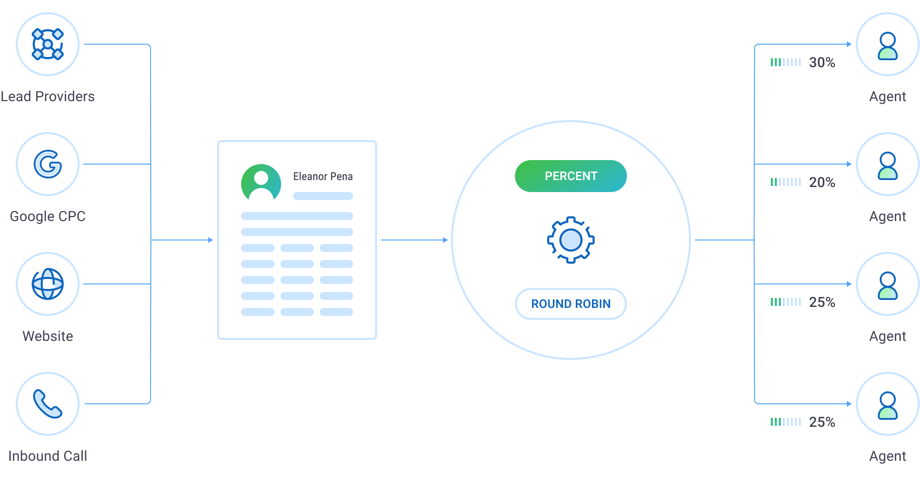
- Push assigns leads by Round Robin or Weighted rotation
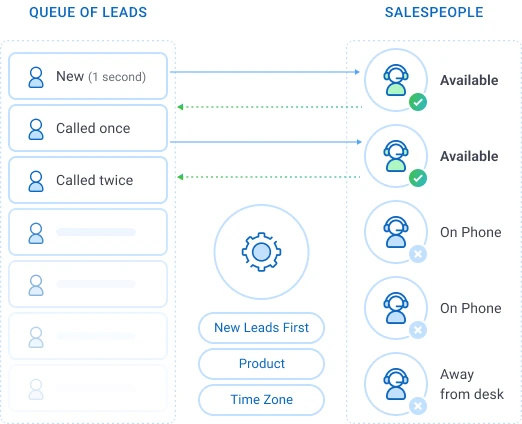
- Pull lets reps take the next best lead when they’re ready
- Combine them: push to a branch, then let reps pull within it
 for sales teams
Call and lead routing software sends each new web lead and inbound call to the right agent, branch or queue by rules you set. SalesExec, from ClickPoint Software, routes leads with Push and Pull distribution and routes calls with IVR call flows and agent queues, then links every call to a lead record so sales teams see the full history.
Over 14,000 users depend on ClickPoint for lead management.
Last updated:
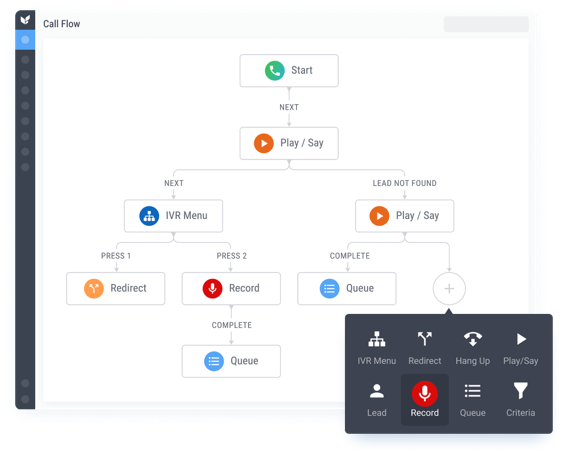
SalesExec routes leads and calls with two separate tools that work together: Push and Pull distribution for web leads, and Call Flows for inbound calls.
Push sends leads by Round Robin or Weighted rotation and by criteria on any lead field; Pull lets reps take the next best lead when they’re ready.
User State Criteria limits the states each agent can receive and work leads from, to support state licensing such as NMLS.
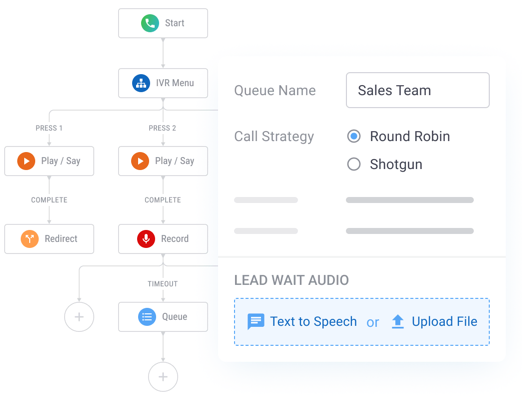
Call Flows qualify callers with IVR menus and route by caller state, ZIP or area code, business hours or dialed number to Round Robin or Shotgun queues.
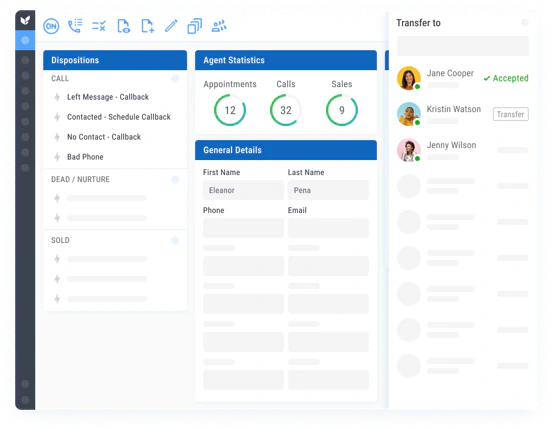
Every inbound call is matched to an existing lead by phone number, or creates a new one, with a screen pop for the agent and the recording in lead history.
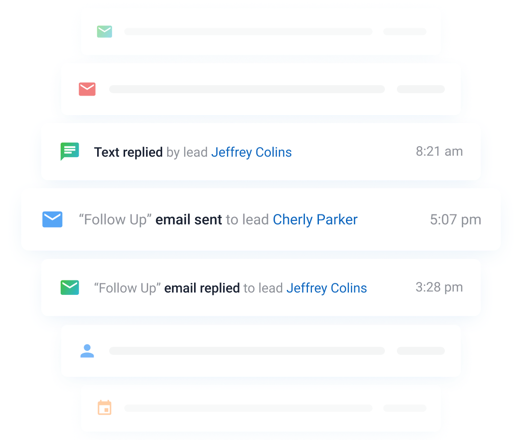
SalesExec routes leads and calls with two separate tools that work together. Lead routing decides which branch or agent gets each web lead. Call routing decides where each inbound call rings. Both meet on the same lead record.
Lead routing
Call routing
One record
See Inbound Call Routing and IVR for Sales Teams and How to Configure "Push" Lead Routing.
How SalesExec gets every lead and call to the right agent
Neither works better for every team. Round robin is best when reps are interchangeable and you want an even split. Skill-based routing, which SalesExec handles by routing on lead attributes, is best when a lead needs a rep with a specific product, territory or state license.
| Method | Routes | How it works | Best when | In SalesExec |
|---|---|---|---|---|
| Round Robin | Push | Rotates leads evenly across eligible reps | Reps are interchangeable and you want an even split | Push method, with Hourly Max and Daily Max caps |
| Weighted | Push | Splits leads by percentage | Top performers should get more leads while newer reps still get some | Push method |
| Shotgun | Calls | Rings every available agent; the first to accept wins | Answering fast matters more than an even split | Call queue strategy |
| Criteria or attribute-based (“skill-based”) | Push and calls | Routes on lead fields such as source, product or value, or on IVR choices | A lead needs a rep with a specific product, territory or state license | Push criteria (equals, contains, in, not in), User State Criteria, IVR menus |
| Pull | Leads | Reps take the next best lead when they’re ready | Volume varies and no lead should sit on a busy rep’s list | Pull Priorities, Shift Hours, State Hours, Auto-Pull |
Sources: How to Configure "Push" Lead Routing; Pull-Based Lead Management and Intelligent Lead Prioritization; Inbound Call Routing and IVR for Sales Teams.
Push and Pull can be combined: push leads to a branch, then let reps pull within it. Direct Business Lending switched from Push to Pull and reported it helped “decrease lead response time by 95%.”
Branches and territories
SalesExec routes leads to a location by sending them from Corporate to a Branch, then to a User, with Push criteria deciding which branch gets each lead.
Need nearest-location routing? Routing within a radius of a ZIP code, by service territory or by buyer coverage is a LeadExec feature. See LeadExec enterprise lead distribution.
See How to Configure "Push" Lead Routing and Geographic & Territory Lead Routing in LeadExec for setup details.
Licensing and availability
SalesExec routes web leads by state licensing with User State Criteria, which limits the states each agent can receive and work leads from, and by availability with Pull and active-user rules.
SalesExec helps enforce the states you assign. It records each agent’s states but doesn’t verify licenses. This isn’t legal advice. Consult your counsel.
See How to Route Web Leads to Agents by State Licensing in SalesExec for setup details.
See call and lead routing in SalesExec
Watch a web lead and an inbound call reach the right agent in one system.
IVR call flows
A SalesExec Call Flow qualifies callers before they reach an agent, using an IVR menu, caller input and routing rules.
For precise service areas, have callers enter their ZIP code rather than relying on area code.
See Inbound Call Routing and IVR for Sales Teams: How SalesExec Connects Calls to Lead Management for setup details.
Queues
SalesExec queues send each call to an available agent by Round Robin, which rings the agent who has waited longest, or Shotgun, which rings everyone so the first to accept wins.
Explore the SalesExec power dialer for outbound calling
See Inbound Call Routing and IVR for Sales Teams: How SalesExec Connects Calls to Lead Management for setup details.
Lead records
SalesExec matches each caller to an existing lead by phone number, or creates a new lead, so every call becomes part of the lead’s history.
See how SalesExec improves speed to lead
See Inbound Call Routing and IVR for Sales Teams: How SalesExec Connects Calls to Lead Management for setup details.
Reporting
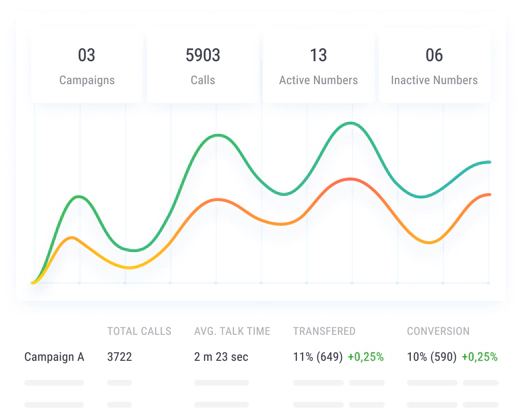
SalesExec routing reports show how leads and calls were distributed and whether agents reached them.
Explore SalesExec lead management reporting
See How to Measure Contact Rate and Call-Center Metrics in SalesExec.
Customer results
Results are reported by individual customers in ClickPoint case studies and on the customer reviews page. Your results will depend on your leads, staffing and process.
SalesExec is rated 4.8 out of 5 from 81 reviews across Google, Capterra and G2.
Using Pull to serve leads by state licensing, lead age, state calling hours and loan officer skill, AMG saw “an increase in total applications by 20%” and “a decrease in cost per lead by 30%.”
After switching from Push to Pull distribution, SalesExec helped “decrease lead response time by 95%.”
“Our contact rate went from 22% to 65%.”
“SalesExec reduced response time on leads from 30 minutes to less than 5.”
SalesExec routing is built for sales teams that receive web leads and inbound calls and need each one to reach an eligible, available agent.
Multi-location
Licensed sales
Inbound sales
Also built for teams in pest control, home improvement, solar, travel and education.
See How to Set Up Call-Center Lead Management in SalesExec.
SalesExec has two plans: Standard at $55 and Advanced at $72 per user per month, billed monthly in USD with no minimum number of users and no long-term contract.
| Plan | Price | Includes |
|---|---|---|
| SalesExec Standard | $55 /user/month | Preconfigured workflows; Standard Support |
| SalesExec Advanced | $72 /user/month | Configurable workflows; Dedicated Support |
Calling, SMS, and optional telecommunications services are billed separately.
See How Much Does SalesExec Cost? Pricing for SalesExec and SalesExec Dialer.
The best inbound call routing software for a sales call center routes each call by rules you control and connects it to the lead it belongs to. SalesExec, from ClickPoint Software, does both. Call Flows qualify callers with IVR menus and route by caller state, ZIP, area code, business hours or dialed number. Queues ring available agents by Round Robin or Shotgun, and every call is matched to a lead record with a screen pop for the agent.
Neither is better for every team. Round robin works when reps are interchangeable and you want an even split of leads. Skill-based routing works when a lead needs a rep with a specific product, territory or state license. In SalesExec, Push sends leads by Round Robin or Weighted rotation, Push criteria route on any lead field, and Pull lets reps take the next best lead they are eligible for. Many teams combine them.
A multi-location business can route leads to a location in SalesExec by sending them from Corporate to a Branch, then to a User, with Push criteria on fields such as state or ZIP code. Inbound calls can route by the caller’s state, ZIP or area code to branch queues or outside numbers. Radius or nearest-location routing, such as a radius around a ZIP code or a service territory, is a feature of LeadExec, ClickPoint’s lead distribution software.
Route each web lead only to agents licensed in the lead’s state, and only when they are available to work it. In SalesExec, User State Criteria limits the states each agent can receive and work leads from, and it works with Pull and the SalesExec Dialer. Pull adds Shift Hours, State Hours and a per-rep Daily Max, and Push can send leads only to recently active users. SalesExec records states but does not verify licenses.
Yes. When a caller calls back, SalesExec can route the call to the last agent who connected with them, so the prospect reaches someone who already knows the conversation. Each call is also matched to the caller’s lead record by phone number, using the most recent lead when the number appears on several, and the agent who answers gets a screen pop with the lead’s history and recordings.
In SalesExec, each queue has a Maximum Queue Size, and calls beyond it overflow to another queue or destination. Callers hear wait audio while they hold, and calls ring only agents who are online and set to Available. A Redirect can send calls to another call flow or an outside number, such as a mobile phone or another office, and missed-call voicemails appear on the lead record.
SalesExec Standard costs $55 per user per month and includes preconfigured workflows. SalesExec Advanced costs $72 per user per month and includes configurable workflows. Billing is monthly in USD, with no minimum number of users and no long-term contract. Calling is billed separately, at $0.025 per minute pay-as-you-go or $155 per active user per month for the Unlimited Dialing Add-On.
> Inbound Call Routing and IVR for Sales Teams: How SalesExec Connects Calls to Lead Management
> How to Route Web Leads to Agents by State Licensing in SalesExec
> How to Configure "Push" Lead Routing
> Geographic & Territory Lead Routing in LeadExec
> Pull-Based Lead Management and Intelligent Lead Prioritization
> How Much Does SalesExec Cost? Pricing for SalesExec and SalesExec Dialer
Push and Pull lead routing, IVR call flows and agent queues in one lead management platform.