
+66%
Faster Response. More Deals. 66% Higher Productivity.
“ClickPoint reduced response time on leads from 30 minutes to less than 5, helping to close more deals, increasing productivity by 66%!”
Jeff Walter
Sales & Retention Manager, Terminix
 for sales teams
No lead gets lost. Reps pull the next priority lead the moment they are ready to work it.
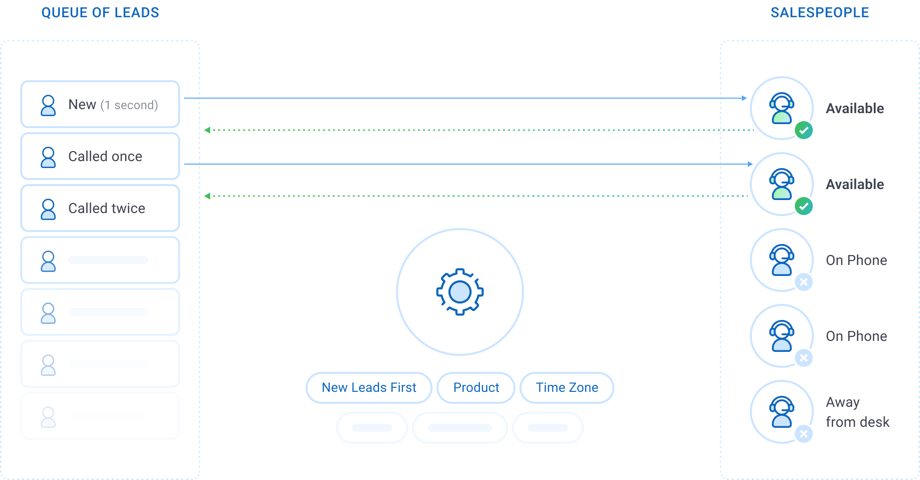
Pull distribution holds leads in a shared, prioritized queue. Each rep pulls the next lead when ready, works it, and enters a disposition before pulling another. Leads that go unreached return to the queue for another attempt, and every lead receives the full number of contact attempts.
Your company has already paid to generate each lead. SalesExec’s Pull distribution helps your team turn more of that investment into conversations and sales.
Leads stay in prioritized queues until a rep is ready to work them. Unreached leads return for additional attempts. Available reps keep leads moving through breaks, lunches, and time off, while fast, effective closers can work more opportunities.
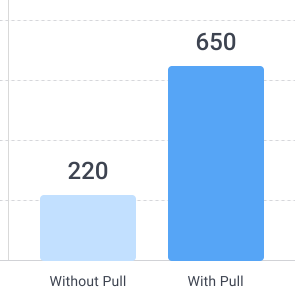
Prospects reached per 1,000 leads
+430
more reached
At Rentokil's reported contact rates, every 1,000 leads represents 650 prospects reached instead of 220. That is 430 additional opportunities to sell from the same lead volume.
Step 1
Create pull strategies that define which leads qualify and which reps can pull them.
Each strategy draws leads from a specific branch, the corporate level, a parent branch, or a defined list of sources. Criteria rules control which leads enter the queue. Multiple strategies give specialized teams their own lead segments.
Step 2
Control the order in which reps receive leads.
Pull priorities sort the queue by pull count and date added. The default order serves the leads with the fewest attempts first, then the oldest, a first-in, first-out model. Cascading queues move leads from the highest-value segment into the next once each list has been called.
Step 3
Compliance rules apply before a lead reaches a rep.
Every pull strategy includes Do Not Phone protection by default. State calling hours filter leads by the lead's state and convert automatically to each rep's time zone. Shift hours turn strategies on and off on a set schedule.
Step 4
The Pull Screen presents one lead at a time with the tools to call, follow up, and disposition.
Reps click Pull Record to load the next lead, or turn on Auto-Pull to load the next lead immediately after each disposition. Click-to-dial, sales scripts, notes, and email templates are on the same screen.
Step 5
Leads return to the queue until the contact strategy is complete.
When a rep misses a contact, the lead goes back to the queue for the next available rep. The Unworked Leads Queue reclaims leads that sit idle past a set assignment time and makes them available to pull again. Pull release timers in the workflow space attempts into a calling cadence.
Pull lead distribution is a model in which leads wait in a shared, prioritized queue and sales reps request the next lead when they are ready to work it. A rep works and dispositions each lead before pulling another. The rep owns the lead once it reaches a set sales stage or closes.
Push methods such as round robin, weighted, and shotgun assign each lead to a rep when the lead arrives. Pull holds each lead in the queue until a rep is available. Leads keep moving through breaks, lunches, and time off, and top performers work as many leads as they can handle. SalesExec makes Pull queues a core part of its sales workflow, combining lead prioritization, calling, dispositions, and recycling in one platform.
Reps pull the next priority lead the moment they are ready to work it.
SalesExec brings the complete Pull process into one platform: prioritized queues, calling, dispositions, lead recycling, and performance reporting.
Pull is a core part of how SalesExec helps sales teams convert more of the leads they already have.
Rentokil, Terminix, and TruGreen used SalesExec’s Pull distribution to reach more prospects, improve sales productivity, and generate more revenue. Their results show the economic impact of changing how sales teams work leads.
+66%
“ClickPoint reduced response time on leads from 30 minutes to less than 5, helping to close more deals, increasing productivity by 66%!”
Jeff Walter
Sales & Retention Manager, Terminix
22% → 65%
“Our contact rate went from 22% to 65%... ensuring a quick ROI.”
Monica Brogan
Director, Inside Sales, Rentokil
~75%
“Since working with ClickPoint, we have increased our digital sales by approximately 75%.”
Matt Zoller
Sales Director, TruGreen
Leads cascade through queues in order of value, from new web leads to callbacks and win-backs.
The next lead loads after each disposition and keeps reps on the phone between calls.
Do Not Phone protection, state calling hours, and shift hours apply to every pull strategy.
Unreached and idle leads return to the queue for the next available rep.
Set a daily maximum for each rep on each strategy.
Track each agent's first pull, last pull, and total pulls across any date range.
ClickPoint provides 24 hour chat support, extensive product documentation, and weekly training sessions.