Speed to lead
What affects speed to lead
Speed to lead depends on staffing, queue setup, lead volume and agent availability.
Measure response time by hour to see when new leads wait longest.
 for call centers
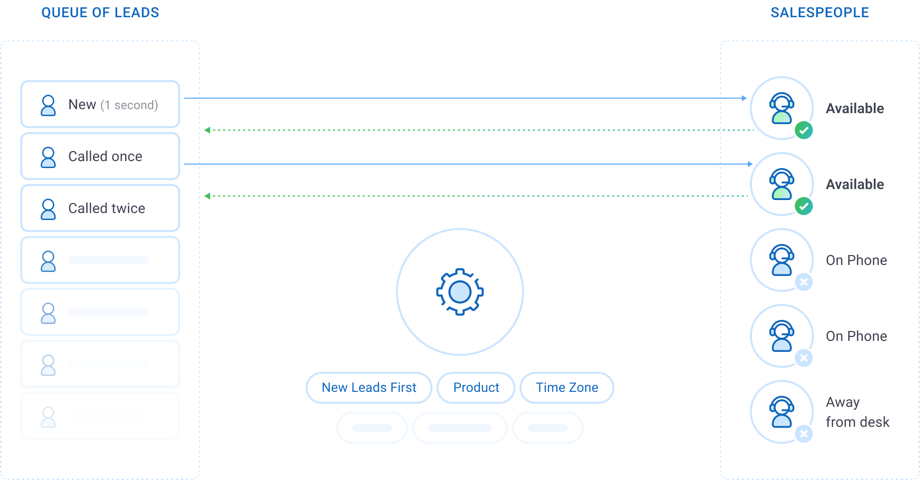
Speed to lead is the time from receiving a lead to the first contact attempt. SalesExec is lead management software for call centers and inside sales teams working purchased and inbound web leads. It notifies agents of new leads, sends the team’s welcome text, and runs email and SMS follow-up. Managers can set Pull queues to rank the newest leads first. Terminix reports SalesExec reduced response time on leads from 30 minutes to less than 5 minutes.
Last updated:

Speed to lead measures how fast the first contact attempt on a new lead happens. Contact rate measures the percentage of leads reached in a period.
SalesExec notifies agents of new leads by email, in-app popup or in-app notification. Managers can set Pull queues to rank the newest, never-pulled leads first.
A new-lead automated event in SalesExec texts each new lead from the team’s own templates and skips leads that have opted out.
Agents call new leads with the SalesExec Dialer, a built-in power dialer that calls one lead at a time for each agent.
Follow-up in SalesExec is no-code. Standard includes preconfigured workflows, and Advanced lets managers configure their own.
The speed-to-lead clock starts when a lead arrives from a web form or a lead provider and stops at the first contact attempt. The longer a new lead waits, the greater the risk that the prospect loses interest, contacts a competitor or becomes harder to reach.
Speed to lead
Speed to lead depends on staffing, queue setup, lead volume and agent availability.
Measure response time by hour to see when new leads wait longest.
Contact rate
Speed to lead: how quickly the first contact attempt happens.
Contact rate: the percentage of leads reached in a period, as each team defines contact.
A team with a fast first attempt can still reach few leads. Track both measures.
The full process
Prioritize the right leads first.
Give agents efficient calling tools.
Follow up consistently.
Measure how many attempts result in contact.
See Speed-to-Lead and Contact Rate Optimization for Call Centers.
Video · 2:09
Speed to lead matters to teams that pay for leads because each lead’s cost is fixed and delay lowers the chance of a conversation. Research published in Harvard Business Review in March 2011 found that firms that tried to contact a lead within an hour were nearly seven times as likely to qualify it as firms that waited one more hour, and more than 60 times as likely as firms that waited 24 hours or longer.
Source: The Short Life of Online Sales Leads, Harvard Business Review, March 2011
0:00 You already paid for the lead. The clock starts the second it arrives. If you buy or generate leads for home services, pest and lawn, insurance, debt or tax, speed is how you protect that spend.
0:14 Speed to lead is the time between a new inquiry arriving and your team's first contact attempt. That gap matters.
0:22 People shop more than one company and fill out more than one form. The first team that reaches them has the conversation. Everyone else is late.
0:31 In a 2011 Harvard Business Review article, researchers looked at 1.25 million sales leads. Firms that tried to contact a customer within an hour were nearly seven times as likely to qualify the lead, meaning have a meaningful conversation with a key decision maker, as firms that waited even one more hour. Those same faster firms were more than 60 times as likely to qualify a lead as companies that waited 24 hours or longer.
1:00 [On screen: Example, not your prices, not a promise.] Say you buy 500 leads a month at 40 dollars a lead. That is 20,000 dollars a month, or 240,000 a year, before anyone picks up the phone. That cost does not shrink if the first call happens an hour later or the next day. What changes is the chance of a real conversation. Lead spend is fixed. Delay is how that spend goes cold.
1:24 This is usually a process problem.
1:27 SalesExec is software for that workflow. It is not a lead seller. SalesExec decides which lead a rep should work next, connects the call, text or email and records what happened.
1:39 Speed is only half the job. The other half is proof you followed the rules. SalesExec can check do-not-contact flags, state calling hours and text opt-in status before a call, text or email goes out and keep a history of attempts. These are tools, not a guarantee of compliance.
1:58 The question is whether the next one gets a fast, documented first attempt or goes cold.
The dollar figures are an example, not your prices and not a promise. SalesExec’s checks are tools, not a guarantee of compliance. Music: “Inspired” by Kevin MacLeod (incompetech.com), licensed under CC BY 4.0.
SalesExec improves speed to lead in five steps.
Notifications and queues
SalesExec notifies agents when a new lead arrives. A Pull queue is a shared queue that agents draw leads from. By default a Pull queue orders leads by lowest pull count, then date added. Managers can set a queue to rank the newest, never-pulled leads first, so the next available agent takes the newest lead.
Learn about Pull lead distribution
See How to Configure System Notifications in SalesExec and Pull-Based Lead Management and Intelligent Lead Prioritization for setup details.
New-lead SMS
SalesExec texts new leads when they enter the system, once a team sets up a new-lead automated event. The event starts an SMS nurture strategy, a timed series of texts that sends the team’s templates on the cadence the team sets. The welcome text is an automated first message. The first contact attempt is the agent’s first call.
Explore SalesExec text marketing software
See Automatically Send SMS Templates with Nurture and How SalesExec Checks Do Not Contact (DNC) Compliance for Calls, SMS, and Email for setup details.
See speed to lead in SalesExec
Watch a new lead arrive: SalesExec alerts the agent and sends the welcome text, and the agent places the first call.
Integrated calling
The SalesExec Dialer is a power dialer built into SalesExec. An agent who receives a new lead calls it with click-to-dial, in the same system that prioritized the lead. The dialer calls one lead at a time for each agent, and the agent logs the outcome before moving to the next lead.
See scripts, voicemail drop, local presence and more in the SalesExec power dialer
See SalesExec Power Dialer: What It Is, How It Works, and How to Set It Up for setup details.
No-code automation
A manager or administrator sets up automated lead follow-up in SalesExec with no developer. Workflows, automated events, email and SMS templates and nurture strategies are no-code, and each runs on the leads that meet its conditions. SalesExec Standard includes preconfigured workflows. SalesExec Advanced adds configurable workflows.
See How to Follow Up on Purchased Internet Leads with the SalesExec Power Dialer and How to Post Leads into SalesExec Using Zapier for setup details.
Reporting
SalesExec reports show managers how long new leads take to reach and how follow-up performs. The Hourly Performance Snapshot shows, by hour, how long leads wait to be contacted. Other reports cover Push and Pull distribution performance, results by number of attempts, results by lead source, and KPIs for dials, contacts and sales.
Each report defines contact rate in its own way. A good contact rate is specific to each team’s leads, staffing and process.
Customer results
Terminix reports that SalesExec reduced response time on leads from 30 minutes to less than 5 minutes. Rentokil reports that its contact rate rose from 22% to 65% with SalesExec. Both results are reported by the customers and published on ClickPoint’s customer reviews page. Results depend on each team’s leads, staffing and process.
SalesExec is rated 4.8 out of 5 from 81 reviews. Read the Direct Business Lending case study.


SalesExec is built for call centers and inside sales teams that buy or generate web leads, also called internet leads, and work them by phone and text. Typical users are home services call centers, inside sales teams and lead buyers working leads from several lead providers. SalesExec also serves teams in pest control, home improvement, mortgage, insurance, solar, travel and education.
Home services
Notify agents of each new lead and put new leads first in a shared Pull queue.
Inside sales
Shared Pull queues give the next prioritized lead to the next available agent, and workflows schedule the next attempt after no contact.
Lead buyers
Each lead provider is tracked as its own lead source, and duplicate checks reject incoming leads that match the team’s duplicate rules.
SalesExec has two plans: Standard at $55 and Advanced at $72 per user per month, billed monthly in USD with no minimum number of users and no long-term contract. Both plans include lead management, lead prioritization, Pull-based lead assignment, sales engagement and reporting.
| Plan | Price | Includes |
|---|---|---|
| SalesExec Standard | $55 /user/month | Preconfigured workflows; Standard Support |
| SalesExec Advanced | $72 /user/month | Configurable workflows; Dedicated Support |
Calling, SMS, and optional telecommunications services are billed separately.
See How Much Does SalesExec Cost? Pricing for SalesExec and SalesExec Dialer.
Speed to lead is how long a new lead waits before the first contact attempt. Research supports a first attempt within the first hour: firms that tried to contact a lead within an hour were nearly seven times as likely to qualify it as firms that waited one more hour, according to research published in Harvard Business Review in March 2011.
A home services call center improves speed to lead by notifying agents when a new lead arrives, setting a shared Pull queue to rank the newest leads first, and setting up a new-lead event that texts each new lead. SalesExec supports all three.
SalesExec, lead management software from ClickPoint Software, speeds follow-up on inbound leads. It notifies agents of new leads, gives the next prioritized lead to the next available agent, and schedules the next attempt after no contact.
SalesExec texts new leads when they enter the system, after a team sets up a new-lead automated event. The event sends the team's templates on the team's schedule and skips leads with a Do Not Contact flag or an SMS opt-out.
In SalesExec, managers and administrators set up automated events, email and SMS templates and nurture strategies with no code. SalesExec Standard includes preconfigured workflows, and SalesExec Advanced adds configurable workflows.
SalesExec notifies agents of new leads by email, in-app popup or in-app notification. Administrators set notifications at the corporate or branch level, with user-level overrides.
Yes. A manager can set a SalesExec Pull queue to rank the newest, never-pulled leads first. By default a Pull queue orders leads by lowest pull count, then date added.
No. SalesExec receives Facebook Lead Ads and other ad-platform leads through Zapier or webhooks, with no custom software development. Each source can be tracked as its own lead source.
Yes. The SalesExec Hourly Performance Snapshot report shows, by hour, how long leads wait to be contacted.
SalesExec Standard costs $55 per user per month and SalesExec Advanced costs $72 per user per month, billed monthly in USD with no minimum number of users and no long-term contract. Calling, SMS and optional telecommunications services are billed separately.
> Speed-to-Lead and Contact Rate Optimization for Call Centers
> Pull-Based Lead Management and Intelligent Lead Prioritization
> How to Configure System Notifications in SalesExec
> Automatically Send SMS Templates with Nurture
> How SalesExec Checks Do Not Contact (DNC) Compliance for Calls, SMS, and Email
> SalesExec Power Dialer: What It Is, How It Works, and How to Set It Up
> How to Follow Up on Purchased Internet Leads with the SalesExec Power Dialer
> How to Post Leads into SalesExec Using Zapier
> Hourly Performance Snapshot Report
> How to Set Up Call-Center Lead Management in SalesExec
> How Much Does SalesExec Cost? Pricing for SalesExec and SalesExec Dialer
New-lead notifications, prioritized Pull queues, new-lead texts and follow-up workflows in one lead management platform.